
昔、N88BASICでは、LINE(100,100)-(135,100),7 と書けば線が引けた。
現在、Unityで線を引くにはLineRendererを使ってという方法はありますが、いろいろややこしい。
あと、ガタガタしたドット感のある線を引くのは難しい。
そんなわけで、昔読んだ C言語による標準アルゴリズム事典 に線を引くのがあったなと思い出して、Unityに持ってきた。
Unityのテクスチャを生成して、同じサイズのColor32の配列を用意して、自分の配列に線をひいて、Unityのテクスチャに書き込むようにした。
そのコードをまるっと載せてみる。
スクショ
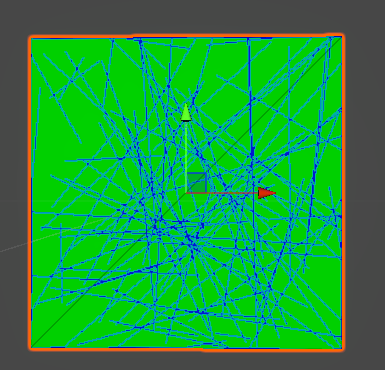
コード
using UnityEngine;
class BitMap
{
Color32[] _pixels;
Vector2Int _size;
private Texture2D _texture;
public Texture2D Texture => _texture;
public BitMap(Vector2Int size)
{
_size = size;
_pixels = new Color32[_size.x * _size.y];
_texture = new Texture2D(_size.x, _size.y, TextureFormat.RGBA32, false, false);
}
public void Dispose()
{
if (_texture != null)
{
Object.Destroy(_texture);
_texture = null;
}
_pixels = null;
}
int GetIndex(int x, int y)
{
var x2 = Mathf.Clamp(x, 0, _size.x – 1);
var y2 = Mathf.Clamp(y, 0, _size.y – 1);
return _size.x * y2 + x2;
}
void SetPixel(int x, int y, Color32 pixel)
{
var index = GetIndex(x, y);
_pixels[index] = pixel;
}
public void Line(int x1, int y1, int x2, int y2, Color32 color)
{
Line(new Vector2Int(x1, y1), new Vector2Int(x2, y2), color);
}
public void Line(Vector2Int p1, Vector2Int p2, Color32 color)
{
gr_line(p1.x, p1.y, p2.x, p2.y, color);
}
public void Clear(Color32 color)
{
for (var n = 0; n < _pixels.Length; n++)
{
_pixels[n] = color;
}
}
public void ApplyTexture()
{
var array = _texture.GetPixelData(0);
for (var n = 0; n < array.Length; n++) { array[n] = _pixels[n]; } _texture.Apply(); } // 線を引くコードは C言語による標準アルゴリズム事典 のサポートページから引用。 // https://github.com/okumuralab/algo-c/blob/main/src/line.c static int abs(int x) => Mathf.Abs(x);
void gr_dot(int x, int y, Color32 color) => SetPixel(x, y, color);
void gr_line(int x1, int y1, int x2, int y2, Color32 color) /* 線分を描く */
{
int dx, dy, s, step;
dx = abs(x2 – x1); dy = abs(y2 – y1);
if (dx > dy)
{
if (x1 > x2)
{
step = (y1 > y2) ? 1 : -1;
s = x1; x1 = x2; x2 = s; y1 = y2;
}
else step = (y1 < y2) ? 1 : -1; gr_dot(x1, y1, color); s = dx >> 1;
while (++x1 <= x2)
{
if ((s -= dy) < 0) { s += dx; y1 += step; } ; gr_dot(x1, y1, color); } } else { if (y1 > y2)
{
step = (x1 > x2) ? 1 : -1;
s = y1; y1 = y2; y2 = s; x1 = x2;
}
else step = (x1 < x2) ? 1 : -1; gr_dot(x1, y1, color); s = dy >> 1;
while (++y1 <= y2)
{
if ((s -= dx) < 0)
{
s += dy; x1 += step;
}
gr_dot(x1, y1, color);
}
}
}
}
public class Main : MonoBehaviour
{
[SerializeField]
private Renderer _renderer;
Material _material;
BitMap _bitMap;
void Start()
{
_bitMap = new(new Vector2Int(256, 256));
_material = _renderer.material;
_material.mainTexture = _bitMap.Texture;
{
_bitMap.Clear(Color.green);
_bitMap.ApplyTexture();
}
for (var n = 0; n < 100; n++)
{
var x1 = Random.Range(-10, 300);
var y1 = Random.Range(-10, 300);
var x2 = Random.Range(-10, 300);
var y2 = Random.Range(-10, 300);
_bitMap.Line(x1, y1, x2, y2, Color.blue);
}
_bitMap.ApplyTexture();
}
private void OnDestroy()
{
if (_material != null)
{
Destroy(_material);
_material = null;
}
_bitMap.Dispose();
}
void Update()
{
}
}
やっぱ絵が動いてこそ。
あと、白黒がカッコイイ。